Your whole fleet’s uptime, one glance away.
An independent rebuild of the original UptimeBar — Squarecat’s paid Mac app, discontinued years ago. Unaffiliated, free and open source, now on Mac and Windows across four providers. Native alerts the second something goes down.
Free · macOS 10.13+ · Windows 10/11 · all downloads & install notes
7/1/2026
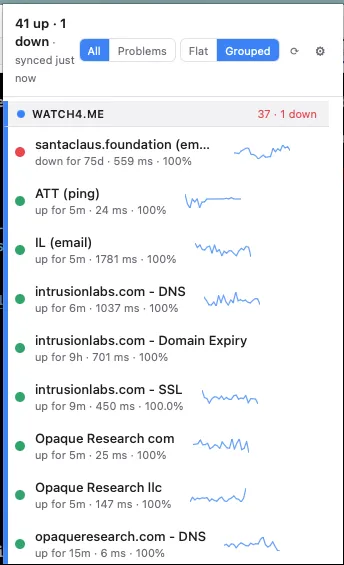
Lives in the macOS menu bar · and the Windows 11 taskbar
Everything a menu-bar uptime app should be
Lightweight, honest, and provider-agnostic — built to feed watch4.me, but genuinely useful with whatever you already run.
Your whole fleet, one glance
The tray icon reflects aggregate up/down at all times. Open the popover for every monitor, with latency and “down for Xm” inline.
Native alerts, only when it matters
A native OS notification fires the moment a monitor flips up↔down — no SMS needed. The first poll sets a silent baseline, so no startup notification storm.
Multi-provider by design
One view across UptimeRobot, BetterStack, Healthchecks.io — and watch4.me as the best-integrated provider. Mix them freely. (Uptime Kuma support is coming.)
A flaky API never fakes an outage
Provider errors map to “Unknown”, not “Down”, after repeated failures — so a hiccup on their side never masquerades as your site going down.
Self-hosted? Point it at your instance
Healthchecks.io takes a custom base URL — bring your own instance and UptimeBar watches it like any other. (Self-hosted Uptime Kuma is coming.)
Quiet, native, always on
A lightweight menu-bar (Mac) / system-tray (Win) app that keeps monitoring in the background.
UptimeBar is open source
The whole app lives on GitHub — read the code, see how it talks to each provider, and tell us what would make it better for your setup. Feature requests, provider ideas, and bug reports are genuinely welcome: the roadmap (like Uptime Kuma support) is shaped by what you ask for.
Put your uptime where you can see it.
Free for Mac & Windows. Set up your first monitor in a minute.